What is USPS IMpb Email tracking and how do I use it?
USPS offers a service to send email tracking updates for IMpb mail pieces such as Certified Mail, Priority Mail and Express Mail. Click2Mail facilitates your use of this service at no cost. For each mail piece, you can provide up to 3 email addresses. USPS will send IMPB tracking updates to these email addresses in near real time as the mail piece travels to its destination address.
For this feature to take effect, go to My account → Profile & Preferences → Notification Setting.
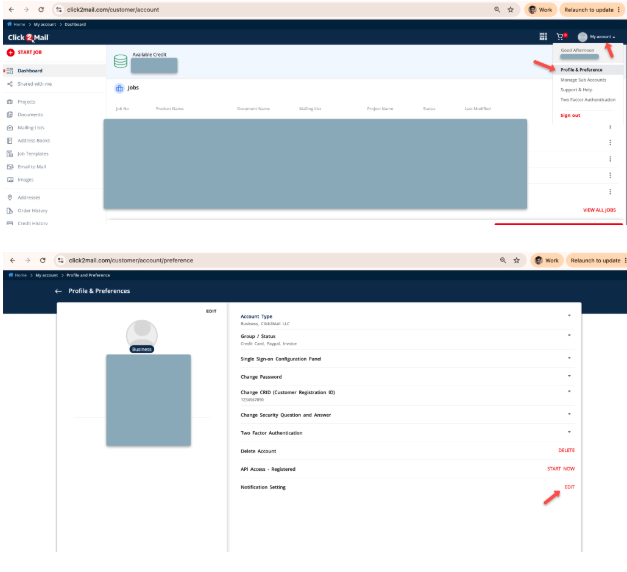
Select “Send IMpb tracking to my primary email” to specify your Click2mail account registered email address. Or select “Send IMpb tracking to alternate email address” to specify a different email address. This will register the email address for every IMPB mail piece that is sent from this account.
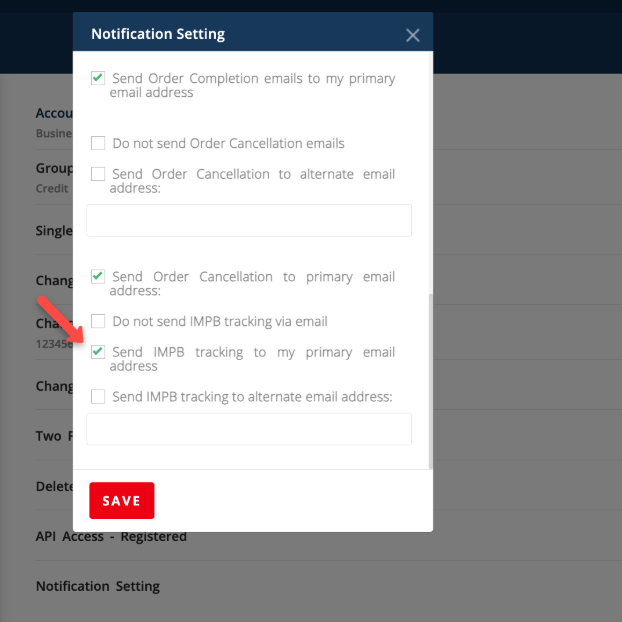
Additionally, you can specify two more email addresses for each IMpb mail piece you send. If you are uploading your address list via the UI, use the two reserved columns “c2m_tracking_email1” and “c2m_tracking_email2”

If you are uploading the address list via the REST API, please create a new mapping ID by uploading a sample CSV with the two reserved columns “c2m_tracking_email1” and “c2m_tracking_email2”. Here is the documentation for uploading a sample address list and obtaining a mapping ID:
https://developers.click2mail.com/docs/using-mail-merge
Follow it till Step 4.
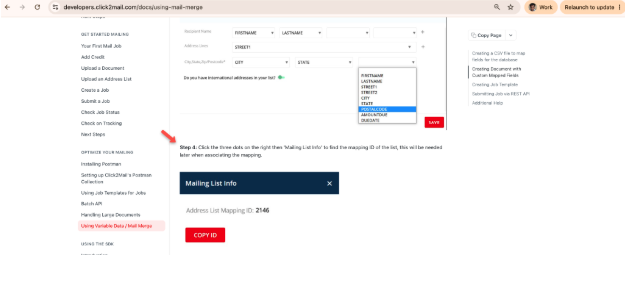
Use the mapping ID you created to upload your address list using the POST /addressLists API.
Carly Brown
Comments